Most teams meet Consent Mode the way you meet a smoke alarm at 3 a.m.: something stopped working, and a vendor told them this was why. Conversions disappeared from a campaign, an audience refused to populate, and the fix was a phrase they’d never had to understand before. Consent Mode is the bridge between a visitor’s cookie-banner choice and how your tracking behaves — and when it’s misconfigured, it breaks measurement and compliance at the same time.
This guide explains what Consent Mode actually does, the difference between its basic and advanced implementations, and the configuration mistakes that silently corrupt data. It’s written for anyone running Google’s tools in a region where consent is legally required — and for anyone weighing whether a consent-free analytics setup would sidestep the whole problem.
What Consent Mode Actually Does
Consent Mode is a signaling layer. Your cookie banner records whether a visitor agreed to analytics storage and ad storage, and Consent Mode passes that decision to Google’s tags as a set of consent states. The tags then adjust their behavior based on those states rather than firing identically for everyone.
The core states are analytics_storage and ad_storage, each set to granted or denied. Later versions added states covering ad personalization and ad-user data, which is the practical reason newer implementations exist: advertising features need their own explicit consent signals, separate from analytics. The principle is unchanged — the banner decides, Consent Mode relays, the tags respond.
| Consent state | Governs | When denied |
|---|---|---|
analytics_storage |
Analytics cookies and identifiers | No analytics cookies set; cookieless pings only |
ad_storage |
Advertising cookies | No ad cookies; limited ad measurement |
ad_user_data |
Sending user data to ad platforms | User data withheld from ad systems |
ad_personalization |
Personalized advertising | Ads served non-personalized |
Basic vs Advanced Implementation
There are two ways to wire Consent Mode in, and the choice has real consequences for both your data and your compliance posture.
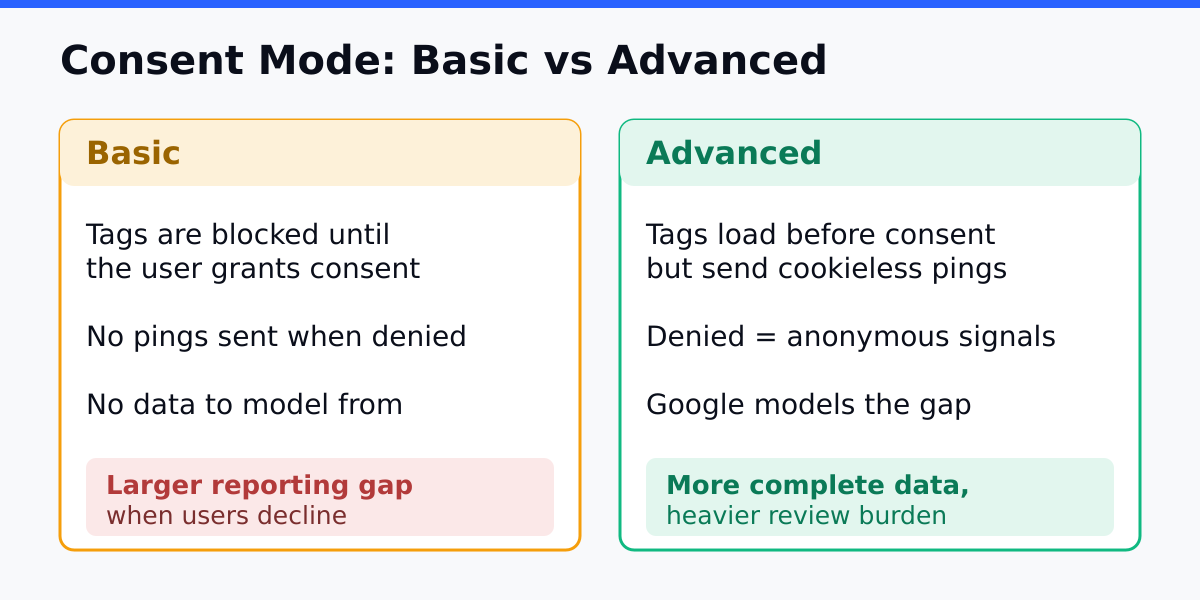
Basic implementation blocks the Google tags from loading at all until a visitor consents. Before consent, nothing fires — no cookies, no pings, no data. It’s the more conservative posture: a visitor who declines is genuinely invisible to Google’s tools. The cost is a complete blind spot for everyone who says no, which on many sites is a large share of traffic.
Advanced implementation loads the tags immediately but in a restricted mode. When consent is denied, the tags send cookieless pings — signals with no identifiers and no stored cookies. Google uses these to model the behavior of non-consenting users in aggregate, recovering a portion of the data lost to declines. You get fuller measurement; the trade-off is that you’re sending anonymous pings before consent, which you must disclose and which some interpretations of consent law treat with caution.
| Dimension | Basic | Advanced |
|---|---|---|
| Behavior before consent | Tags don’t load | Tags load, send cookieless pings |
| Data on non-consenters | None | Modeled from anonymous pings |
| Compliance posture | More conservative | Requires careful disclosure |
| Reporting completeness | Lower | Higher, partly modeled |
Neither is universally correct. The advanced approach gives you better numbers; the basic approach gives you a cleaner story when a regulator or a privacy-minded customer asks what happens before someone clicks “accept.” Decide based on your risk tolerance and the legal advice that applies to your jurisdiction, not on which produces prettier dashboards.
How Modeling Fills the Gap
With the advanced setup, Google uses the cookieless pings plus observed patterns from consenting users to estimate the conversions and behavior of those who declined. This is a statistical model, not a count. It works better with more traffic, because the model needs enough consenting data to learn from before its estimates are reliable.
The practical implication: low-traffic sites see little benefit from modeling, because there isn’t enough data to model from. High-traffic sites recover a meaningful slice of the conversions that consent declines would otherwise erase. Set expectations accordingly — modeling is a partial recovery, not a return to pre-consent completeness.
The Connection to Server-Side Tracking
Consent Mode and server-side tracking are often confused because both come up in the same “our conversions are missing” conversation. They solve different problems. Consent Mode handles what happens when a visitor declines consent. Server-side tracking handles data loss from ad blockers and browser cookie restrictions, which affect visitors regardless of what they clicked.
They’re complementary, not interchangeable. A complete measurement setup configures Consent Mode for the consent layer and uses server-side tracking for the technical-loss layer. Reaching for one to fix a problem that belongs to the other is a common and frustrating mistake.
Common Mistakes
Mistake 1: Defaulting Consent to Granted
Setting the default consent state to granted before the visitor has chosen means tags fire with full tracking on people who never agreed. That’s both a data-integrity problem and a compliance one. Fix: default every state to denied and only update to granted after an explicit choice.
Mistake 2: Firing Tags Before the Consent Signal Arrives
If your tags load before Consent Mode has set the default states, they fire in an undefined consent context — sometimes with full tracking, sometimes not, depending on timing. Fix: set default consent states as early as possible in the page, before any Google tag loads.
Mistake 3: Forgetting the Advertising Consent States
Implementations carried over from older versions often set only analytics and ad storage, omitting the ad-user-data and ad-personalization states. Ad features then misbehave or stop reporting. Fix: set all the relevant consent states your advertising integrations require, not just the original two.
Mistake 4: Never Testing the Denied Path
Teams test that consent works when granted and assume the denied path is fine. Often it isn’t — cookies still get set, or tags fire fully. Fix: explicitly test the decline flow and inspect what cookies and requests occur when consent is denied.
How to Verify Your Setup
Don’t trust a Consent Mode configuration until you’ve watched both paths with your own eyes. Load your site fresh, decline consent, and inspect the browser’s network and storage tabs. Confirm no analytics or ad cookies are set, and that any requests leaving the page are the cookieless pings you expect — nothing more. Then accept consent and confirm the full tags now fire.
Run the same check on a few key pages, not just the homepage, because banner timing and tag loading can differ across templates. The whole verification takes minutes and catches the configuration errors that would otherwise surface as a compliance gap or a hole in your reporting weeks later.
Continue Learning
- GDPR-Compliant Analytics — the broader compliance picture Consent Mode sits inside.
- Cookieless Tracking — measuring without cookies when consent or browsers block them.
- Server-Side Tracking — the complementary fix for technical data loss.
- Analytics Audit Checklist — catch the silent consent and tracking failures.
- Mistakes and Pitfalls When Switching Analytics Platforms — including consent-related migration traps.
Bottom Line
Consent Mode relays a visitor’s banner choice to Google’s tags so they behave according to what was actually agreed. Choose the basic implementation for a conservative posture where non-consenters are simply invisible, or the advanced one to recover modeled data from cookieless pings — and disclose the latter clearly. Default every consent state to denied, set those defaults before any tag loads, and don’t forget the advertising states.
Above all, test the denied path, not just the granted one. And remember that Consent Mode only addresses consent declines — for data lost to ad blockers and browser restrictions, that’s a job for server-side tracking. Configure both, verify both, and your measurement stays whole without your compliance going sideways.