
Cookieless Tracking: How to Measure Traffic Without Cookies
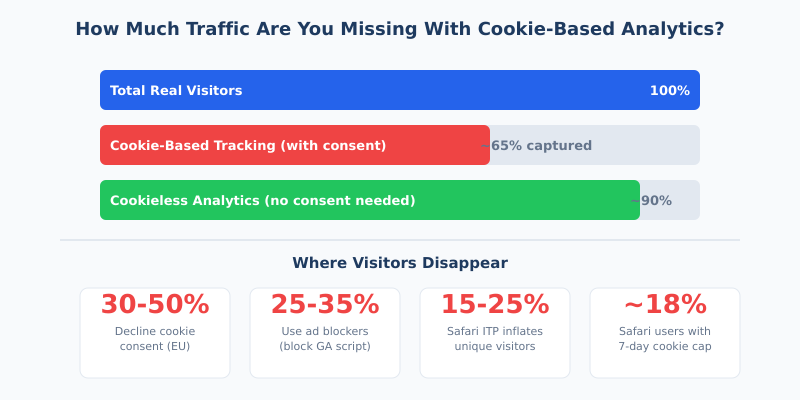
Traditional cookie-based analytics tools are bleeding data. Between ad blockers, Safari’s Intelligent Tracking Prevention, and EU consent banners where 30-50% of visitors click “reject,” the average website now misses 20-50% of its actual traffic in Google Analytics. That’s not a rounding error — it’s a blind spot large enough to wreck your marketing decisions.
Cookieless tracking fixes this by collecting visitor data without storing anything on the user’s browser. No cookies, no consent banners in most cases, and significantly more accurate traffic numbers. Here’s how it works, which methods actually deliver, and how to implement them without breaking your analytics setup.
What Is Cookieless Tracking and Why Does It Matter?
Cookieless tracking refers to any method of measuring website visitor behavior without relying on browser cookies — particularly third-party cookies. Instead of storing a unique identifier on the user’s device, these approaches use server-side processing, aggregated data models, or privacy-preserving browser APIs to understand traffic patterns.
The shift matters for three reasons:
- Data accuracy. Cookie-based tools routinely undercount traffic. Sites with GDPR-compliant consent banners often see only 40-60% of visitors opt in, meaning half your data disappears before analytics even loads.
- Regulatory pressure. The GDPR, CCPA, and ePrivacy Directive treat non-essential cookies as requiring explicit consent. Cookieless tools that don’t process personal data can sidestep this entirely.
- Browser enforcement. Safari and Firefox already block third-party cookies by default. Chrome reversed its full deprecation plan in July 2024, but Privacy Sandbox APIs signal the direction of travel.
The bottom line: if you’re still relying exclusively on cookie-based tracking, you’re making decisions based on incomplete data. And as we covered in our look at common analytics migration pitfalls, bad data is worse than no data — it creates false confidence.
How Much Data Are You Actually Losing?
The gap between what cookie-based analytics report and reality is wider than most marketers realize. Here’s where visitors disappear:
| Data Loss Source | Impact | Details |
|---|---|---|
| Cookie consent rejection (EU) | 30-50% of visitors | Compliant consent banners with neutral design see 40-60% opt-in rates |
| Ad blockers | 25-35% of tech audiences | ~912 million devices globally block tracking scripts (Blockthrough 2024) |
| Safari ITP | 15-25% visitor inflation | JS-set cookies capped at 7 days; link-decorated cookies at 24 hours |
| Firefox ETP | Full 3rd-party block | Total Cookie Protection partitions all cookies by site since Firefox 86 |
| VPNs and privacy tools | 5-10% of traffic | Growing adoption of Brave, DuckDuckGo, and VPN services |
Combined effect: industry estimates suggest cookie-based analytics miss 20-50% of actual traffic, depending on your audience demographics and geography. European audiences skew higher due to GDPR consent requirements.
Privacy-first analytics tools like Plausible consistently report 15-30% more pageviews than Google Analytics on the same website — not because they inflate numbers, but because they don’t depend on cookies that get blocked or rejected.
How Does Cookieless Tracking Work?
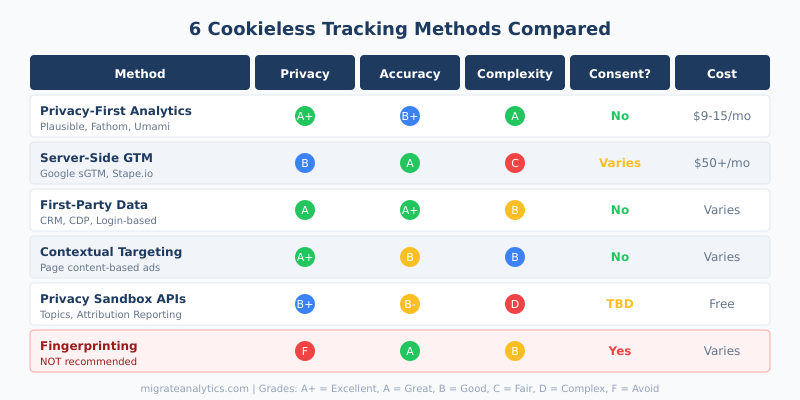
There are six primary approaches to tracking without cookies. Each makes different tradeoffs between privacy, accuracy, complexity, and cost.
1. Privacy-First Analytics (Best for Most Websites)
Tools like Plausible Analytics, Fathom, and Umami track pageviews without cookies and without fingerprinting. They use a hash of the visitor’s IP address, User-Agent string, and a daily-rotating salt to count unique visitors within a single day — no persistent identifier is ever stored.
Why it works: Because no personal data is stored and no cookies are set, these tools typically don’t require a consent banner under GDPR. The French data protection authority (CNIL) has explicitly exempted certain privacy-first tools from consent requirements when configured correctly.
Tradeoff: You lose individual user-level tracking. No user IDs, no session replays, no cross-visit journeys. You get aggregate data — traffic trends, top pages, referral sources, geographic distribution — which is enough for most content and marketing sites.
2. Server-Side Tracking
Server-side tracking moves data collection from the browser to your web server. Instead of a JavaScript tag firing in the visitor’s browser (where it can be blocked), events are captured server-side and forwarded directly to analytics or advertising platforms.
How it works:
- Visitor loads your page normally
- Your server captures the pageview event
- A server-side container (like Google Tag Manager Server-Side) processes the event
- Data is forwarded to GA4, Meta, or other platforms via server-to-server APIs
Key benefit: Server-side GTM recovers an estimated 10-20% of previously lost data by routing through a first-party subdomain that ad blockers don’t recognize. When combined with Google’s Consent Mode v2, modeled conversions can recover ~70% of missing conversion paths.
Tradeoff: Requires technical setup (Cloud Run deployment, subdomain configuration, SSL certificates). Ongoing hosting costs of $50+/month. Not truly “cookieless” — it can still set first-party cookies, though they bypass third-party restrictions.
3. First-Party Data Strategies
First-party data is information users share directly with you: email addresses, account data, purchase history, survey responses. Unlike cookie-based tracking, this data is explicit, consented, and owned by you.
Companies that invest in first-party data see 2.9x higher customer retention and 1.5x better ROI on marketing spend compared to those relying on third-party data (McKinsey). The reason: first-party data reflects actual behavior and intent, not probabilistic guesses.
If you track marketing KPIs using first-party data, the metrics are inherently more reliable because they come from authenticated, verified interactions rather than anonymous cookie trails that break across devices.
4. Contextual Targeting
Contextual targeting serves ads based on page content rather than user history. A visitor reading an article about running shoes sees shoe ads — not because cookies tracked their browsing, but because the page is about running shoes.
This is a return to pre-cookie advertising, now supercharged by NLP and AI-based content analysis. Contextual advertising spend is projected to reach $562 billion by 2030 (Allied Market Research), up from ~$200 billion in 2023.
For websites focused on conversion optimization, contextual signals can be surprisingly effective. As we explored in the psychology of landing pages, context shapes user intent. When the ad matches the content a visitor already chose to consume, alignment with purchase intent is higher than retargeted ads following users across the web.
5. Google Privacy Sandbox APIs
Google’s Privacy Sandbox is a set of browser APIs that aim to replace third-party cookie use cases while preserving user privacy. The key APIs:
| API | Purpose | Status (2026) |
|---|---|---|
| Topics API | Interest-based advertising without individual tracking | Live in Chrome, limited adoption |
| Attribution Reporting | Measures ad conversions with aggregated, noisy data | Available, integrated with Google Ads |
| Protected Audience | On-device remarketing auctions | Available, complex to implement |
| IP Protection | Masks IP addresses via proxy servers | Rolling out in Chrome incognito |
Reality check: Google reversed its plan to fully remove third-party cookies from Chrome in July 2024. Instead, it introduced a “user choice” model. Third-party cookies still work in Chrome by default, making Privacy Sandbox adoption slower than expected. These APIs are worth monitoring but shouldn’t be your primary cookieless strategy today.
6. Fingerprinting — And Why You Should Avoid It
Browser fingerprinting collects device characteristics (screen resolution, installed fonts, hardware specs) to create a unique identifier without cookies. It’s technically effective but legally toxic.
The ePrivacy Directive explicitly covers fingerprinting — it requires the same consent as cookies. The EDPB considers it more invasive than cookies because users can’t clear a fingerprint the way they delete cookies. Major browsers are actively working to block fingerprinting techniques.
Don’t use fingerprinting as a “cookieless” solution. It trades one compliance problem for a worse one.
What Are Browsers Actually Doing With Cookies Right Now?
The cookie landscape varies dramatically by browser. Understanding where your traffic comes from determines how much data you’re losing.
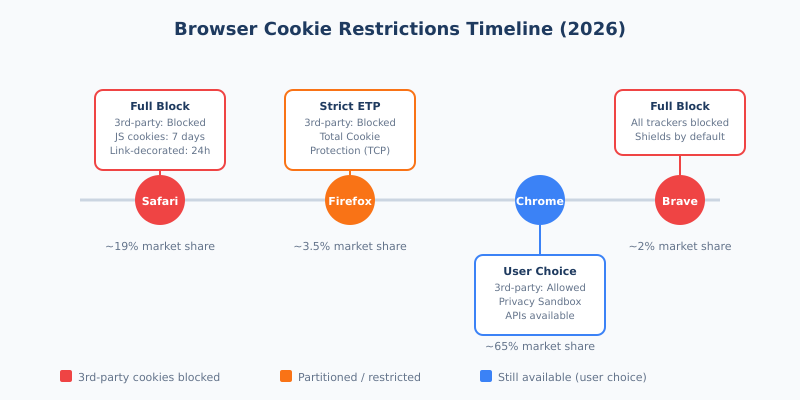
Safari (19% market share) is the most aggressive. ITP blocks all third-party cookies, caps JavaScript-set first-party cookies at 7 days, and link-decorated cookies at 24 hours. A returning Safari visitor after one week looks like a brand-new user in GA4.
Firefox (3.5% share) uses Total Cookie Protection to partition cookies by site, effectively preventing cross-site tracking while preserving per-site functionality.
Chrome (65% share) still allows third-party cookies by default. Google’s Privacy Sandbox APIs are available but optional. The “user choice” prompt is being gradually introduced.
Brave (2% share) blocks everything — cookies, trackers, fingerprinting — with Shields enabled by default.
If your audience skews toward Safari and privacy-focused browsers (common in tech, design, and B2B SaaS), the data gap from cookie-based analytics is even larger. Check your conversion funnel by browser — you might be surprised by the discrepancy.
How to Implement Cookieless Tracking: Step by Step
Here’s a practical implementation path based on your needs:
Step 1: Audit Your Current Tracking Setup
Before switching anything, understand what you currently track and what you’re missing.
- Compare your analytics data with server logs or CDN stats. If server-side requests are 25-40% higher than GA reports, that’s your data gap.
- Check your consent banner opt-in rate. If it’s below 70%, you’re losing significant data.
- Segment existing analytics by browser. Safari and Firefox numbers that look unusually low relative to server logs confirm cookie-related data loss.
Step 2: Run Parallel Tracking for 30-60 Days
Install a cookieless analytics tool alongside your existing setup. Don’t remove GA4 yet — run both to benchmark the difference.
Recommended approach:
- Add Plausible, Fathom, or Umami to your site (5-minute installation — one script tag)
- Keep GA4 running simultaneously
- After 30 days, compare: total pageviews, unique visitors, top pages, referral sources
- The delta between the two tools shows exactly how much data your cookies were hiding
Step 3: Choose Your Stack
Based on your needs, pick one of these three setups:
| Setup | Best For | Tools | Cost |
|---|---|---|---|
| Simple | Content sites, blogs, small businesses | Plausible or Fathom only | $9-15/month |
| Hybrid | Marketing teams running paid ads | Plausible + Server-side GTM + GA4 | $60-100/month |
| Enterprise | Large sites needing full feature set | Matomo (cookieless mode) + CDP | $200+/month |
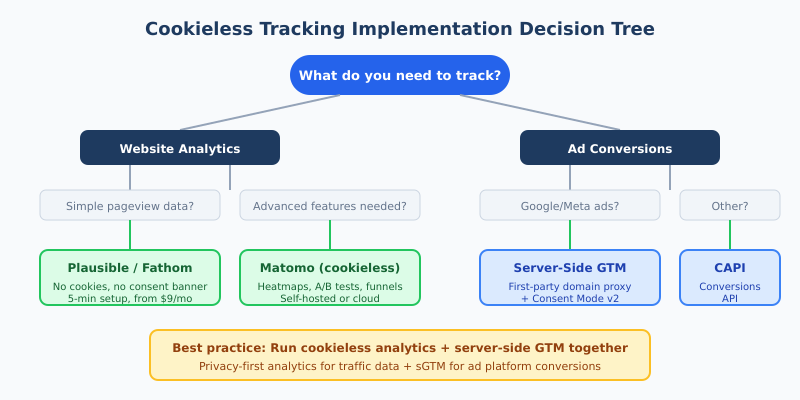
The hybrid approach is the sweet spot for most marketing teams: cookieless analytics for accurate traffic data, plus server-side GTM to maintain ad platform conversion tracking.
Step 4: Update Your Attribution Model
Cookieless tracking typically provides aggregated data rather than individual user journeys. This means traditional last-click attribution breaks down even further. You’ll need to shift toward:
- Media mix modeling (MMM) — statistical models that correlate marketing spend with outcomes at an aggregate level
- Incrementality testing — holdout experiments that measure the true causal impact of campaigns
- Multi-touch attribution using first-party data from logged-in users
This is actually an improvement. Attribution models that rely on complete cookie trails were always fragile. Models built on aggregate trends and controlled experiments are more statistically robust.
Common Mistakes When Going Cookieless
Mistake 1: Assuming “Cookieless” Means “No Consent Needed”
Not all cookieless tools are created equal. If a tool still processes personal data — IP addresses, device fingerprints, or hashed identifiers that can single out individuals — GDPR consent may still be required. Only tools that genuinely avoid personal data processing (or anonymize it irreversibly) qualify for the consent exemption.
Fix: Verify that your cookieless tool is explicitly designed to avoid personal data processing. Check for CNIL exemption status or equivalent DPA guidance.
Mistake 2: Replacing Cookies With Fingerprinting
Some tools marketed as “cookieless” quietly use browser fingerprinting instead. This is legally worse — the ePrivacy Directive covers fingerprinting, and regulators consider it more invasive because users can’t control it. Major browsers are actively developing anti-fingerprinting measures.
Fix: Ask your vendor explicitly: “Does your tool use browser fingerprinting or device identification?” If the answer isn’t a clear “no,” keep looking.
Mistake 3: Not Running Parallel Tracking
Switching analytics tools cold turkey is a recipe for reporting chaos. Historical comparisons break, stakeholders question the numbers, and nobody knows if changes in metrics reflect real trends or just tool differences.
Fix: Run both tools for 30-60 days minimum. Document the delta, explain it to stakeholders, and establish new baselines before retiring the old tool.
Mistake 4: Ignoring Your Data Layer
Server-side tracking is only as good as the data it receives. If your client-side events are poorly structured, inconsistent, or missing key parameters, moving them server-side just amplifies the problems.
Fix: Audit and clean up your data layer before implementing server-side tracking. Define a clear event taxonomy. Test events in staging before pushing to production.
Mistake 5: Using Consent Mode as a Crutch
Google’s Consent Mode v2 uses machine learning to model conversions from non-consenting users. It’s useful, but it’s an estimate — not real data. Over-relying on modeled conversions for optimization decisions can lead you astray, especially for low-volume campaigns where the model lacks training data.
Fix: Treat modeled data as directional, not definitive. For critical decisions, validate with first-party data or incrementality tests.
The Legal Landscape: GDPR, CCPA, and Cookie Consent
Understanding the legal requirements helps you choose the right approach — and avoid expensive mistakes.
| Regulation | Cookie Consent Required? | Cookieless Tracking Implications |
|---|---|---|
| GDPR (EU) | Yes, for non-essential cookies | Tools without personal data processing can be exempt from consent |
| ePrivacy Directive | Yes, for any device storage/access | Fingerprinting also requires consent; truly cookieless tools may be exempt |
| CCPA/CPRA (California) | No opt-in required, but opt-out must be provided | Cookieless tools that avoid “selling/sharing” personal info simplify compliance |
| PECR (UK) | Yes, for non-essential cookies | ICO considers analytics cookies non-essential; cookieless tools simplify compliance |
Key insight: The legal advantage of cookieless tracking isn’t just about avoiding fines. It’s about removing the consent banner — which directly improves data completeness (no more 30-50% opt-out rates) and user experience (no annoying pop-up).
For teams focused on audience segmentation, this is a double win: more data captured means more accurate segments, and segments built on complete datasets drive better targeting.
Continue Learning
Cookieless tracking is one piece of the broader analytics modernization puzzle. These related guides dig deeper into specific aspects:
- Plausible Analytics: A Practical Review for Privacy-Conscious Teams — hands-on walkthrough of a leading cookieless analytics tool
- Last Click Attribution: Why It’s Misleading — why attribution models need to evolve alongside cookieless tracking
- Conversion Funnel Analysis — how to measure drop-offs accurately when cookie-based journeys are incomplete
- Mistakes and Pitfalls When Switching Analytics Platforms — avoid common errors during migration
- Digital Marketing Trends 2026 — the broader industry shifts driving cookieless adoption
Bottom Line
Cookie-based analytics had a good run, but the data they provide is increasingly incomplete. Between browser restrictions, ad blockers, and consent regulations, traditional tracking misses 20-50% of your visitors.
The solution isn’t one-size-fits-all. Content sites and small businesses should look at privacy-first analytics (Plausible, Fathom, Umami) for simplicity and complete data. Marketing teams running paid campaigns need a hybrid approach: cookieless analytics for traffic data plus server-side GTM for conversion tracking. Large enterprises benefit from self-hosted solutions like Matomo in cookieless configuration.
Whatever you choose, start with parallel tracking. Run your new cookieless tool alongside GA4 for at least 30 days. The data gap you discover will make the case for the switch better than any article could.