
GDPR-Compliant Analytics: A Practical Checklist for Businesses
Only 11% of EU cookie consent banners are fully GDPR-compliant. Nearly half of websites set tracking cookies before users even click “accept.” And since 2022, data protection authorities in Austria, France, and Italy have ruled that standard Google Analytics configurations violate EU data transfer rules. If you’re running analytics in Europe without a clear compliance strategy, you’re gambling with fines that start at EUR 20 million or 4% of annual turnover.
The good news: GDPR-compliant analytics is entirely achievable. This checklist breaks down exactly what you need — from cookie consent to data processing agreements to choosing the right tools — so you can measure your website without measuring your legal risk.
What Does GDPR Actually Require for Analytics?
GDPR treats any data that can identify a person — directly or indirectly — as personal data. In analytics, this includes IP addresses (confirmed by the CJEU in Breyer v Germany), cookie identifiers (GDPR Recital 30), device fingerprints, and client IDs like the _ga cookie in Google Analytics.
Three rules define the compliance landscape:
- ePrivacy Directive (Article 5(3)): Any storage or access to information on a user’s device (cookies, local storage, fingerprinting) requires prior consent — unless it’s “strictly necessary” for the service. Analytics cookies are not strictly necessary.
- GDPR (Article 6): Processing personal data needs a legal basis. For analytics with cookies, that’s consent. For cookieless analytics without personal data, legitimate interest may apply.
- GDPR (Articles 44-49): Transferring personal data outside the EU/EEA requires adequate safeguards — the issue that triggered rulings against Google Analytics.
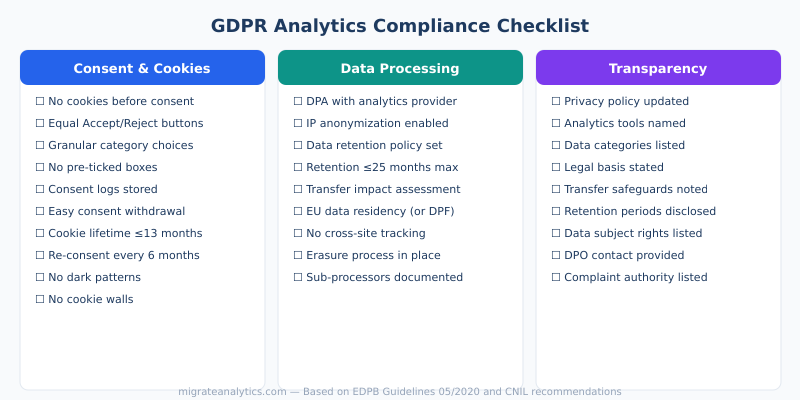
How Should You Implement Cookie Consent?
Cookie consent is where most websites fail. The EDPB’s Guidelines 05/2020 set clear requirements, and DPAs are actively fining violations. CNIL alone issued EUR 150 million to Google and EUR 60 million to Microsoft for non-compliant cookie banners.
Compliant consent must be:
| Requirement | What It Means | Common Violation |
|---|---|---|
| Prior | No cookies set before user consents | Scripts loading before banner interaction |
| Freely given | No cookie walls; access doesn’t depend on consent | “Accept cookies or leave” barriers |
| Specific | Granular choices by purpose/category | Single “accept all” with no alternatives |
| Informed | Clear explanation of what each category does | Vague “we use cookies to improve experience” |
| Unambiguous | Active opt-in; no pre-ticked boxes | Analytics cookies pre-enabled by default |
| Withdrawable | Easy to revoke; as easy as giving it | No way to change preferences after initial choice |
The “Reject All” test: Your “Reject All” button must be equally prominent as “Accept All” — same size, same visual weight, same number of clicks to reach. CNIL’s EUR 150 million Google fine was specifically about making rejection harder than acceptance. Studies show that adding an equal “Reject All” button reduces consent rates by 20-30 percentage points, which is exactly why many sites avoid it — and why DPAs fine them.

What Happened With Google Analytics and EU Data Transfers?
In 2022, a wave of coordinated DPA rulings shook the analytics industry. Triggered by 101 complaints from Max Schrems’ organization noyb, data protection authorities across Europe found that Google Analytics violated GDPR’s data transfer rules.
Key rulings:
- Austria (January 2022): The DSB ruled that a website using Google Analytics unlawfully transferred data to the US. Google’s Standard Contractual Clauses were insufficient because US surveillance laws (FISA 702) allow government access, and Google holds the decryption keys.
- France (February 2022): CNIL confirmed Google Analytics cookie IDs are personal data and gave websites one month to comply or stop using GA.
- Italy (June 2022): The Garante gave websites 90 days to implement compliant measures or stop using GA entirely.
Current status (2026): The EU-US Data Privacy Framework (DPF), adopted in July 2023, provides a legal basis for transfers to US companies like Google that have self-certified. Google is on the DPF list. However, Max Schrems has announced plans to challenge the DPF (a potential “Schrems III”), arguing it doesn’t resolve the underlying surveillance issues. Many privacy lawyers recommend not relying solely on the DPF.
This is why many businesses are shifting to EU-hosted analytics alternatives — not because GA4 is currently illegal, but because the legal ground keeps shifting. As we covered in our guide to analytics migration pitfalls, regulatory uncertainty is itself a business risk worth mitigating.
Which Analytics Tools Are GDPR-Exempt?
France’s CNIL maintains an official list of analytics tools that can be used without cookie consent when configured correctly. The exemption applies because these tools, in their approved configurations, don’t set non-essential cookies or process personal data in ways that require consent.
| Tool | CNIL Exempt? | Cookies? | Data Location | Consent Required? |
|---|---|---|---|---|
| Matomo (configured) | Yes | Optional (can run cookieless) | Self-hosted or EU cloud | No (when configured per CNIL) |
| AT Internet / Piano | Yes | First-party only | France (EU) | No (exempt config) |
| Plausible Analytics | No cookies to exempt | None | EU (Estonia) | No |
| Fathom Analytics | No cookies to exempt | None | EU isolation available | No |
| Umami | No cookies to exempt | None | Self-hosted | No |
| Google Analytics 4 | No | Yes (_ga, _gid) | US (DPF certified) | Yes |
The distinction matters: CNIL-exempt tools like Matomo require specific configuration to qualify. Privacy-first tools like Plausible and Fathom don’t need an exemption because they never set cookies in the first place — there’s nothing to exempt. For a detailed comparison, see our guide to cookieless tracking methods.
How Do You Configure Matomo for CNIL Exemption?
Matomo is the most popular self-hosted analytics platform that qualifies for CNIL’s cookie consent exemption. But the exemption requires specific configuration — the default installation does not qualify.
Required settings:
- Self-host on EU servers (or use Matomo Cloud EU). No US-based hosting.
- Enable IP anonymization: Mask at least 2 bytes (recommended: 3). So
192.168.1.1becomes192.0.0.0. - Set cookie lifetime to 13 months maximum (
visitor_cookie_timeout = 33955200seconds). - Configure data retention: Delete raw data after 6 months maximum. Aggregated reports can be kept longer, up to 25 months.
- Disable User ID tracking: No cross-device or cross-session identification.
- Disable cross-domain tracking: Each website tracked independently.
- Disable heatmaps, session recordings, and A/B testing plugins: These collect granular personal data and disqualify the exemption.
- Honor Do Not Track: Enable DNT browser setting respect in Matomo privacy settings.
- Provide opt-out: Embed the Matomo opt-out iframe on your privacy policy page.
- Do not combine data with advertising, CRM, or other processing operations.
Skip any of these steps and your Matomo installation requires cookie consent just like Google Analytics.

How Much Data Do You Lose to Cookie Consent?
When you must show a consent banner, a significant portion of your visitors will decline. The rates vary dramatically by region and implementation:
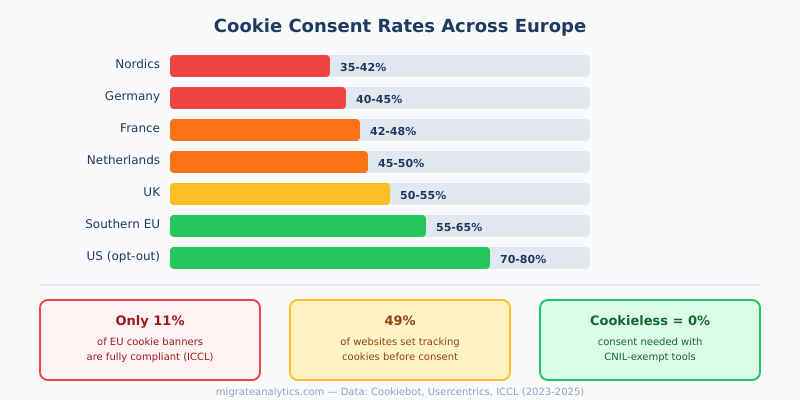
In privacy-conscious markets like Germany and the Nordics, compliant consent banners see only 35-45% acceptance. That means more than half your visitors are invisible to cookie-based analytics. Your marketing KPIs and customer segmentation are built on a subset of your audience — and not a representative one.
This is the practical argument for GDPR-exempt analytics: it’s not just about avoiding fines, it’s about getting complete data. When no consent banner is needed, you capture 100% of visits instead of 40-60%.
What Should Your Privacy Policy Include?
GDPR Articles 13 and 14 specify exactly what your privacy policy must disclose about analytics. Missing any of these items is technically a violation:
| Required Element | What to Include |
|---|---|
| Controller identity | Your company name, address, and contact details |
| DPO contact | Data Protection Officer contact (if required under Article 37) |
| Purposes & legal basis | Why you track (audience measurement) and the legal basis (consent or legitimate interest) |
| Data categories | What you collect: cookie IDs, IP addresses, device data, behavioral data |
| Recipients | Name your analytics provider: “Google LLC” or “Matomo (self-hosted)” |
| International transfers | If data goes to the US, state the safeguard (DPF, SCCs) |
| Retention periods | How long you keep analytics data (e.g., “14 months in GA4”) |
| Data subject rights | Access, rectification, erasure, restriction, portability, objection |
| Complaint authority | Name and link to relevant DPA (e.g., CNIL for France) |

Common Mistakes in GDPR Analytics Compliance
Mistake 1: Loading Analytics Before Consent
A 2023 Cookiebot audit found that 49% of websites set tracking cookies before users interact with the consent banner. If your Google Tag Manager fires the GA4 tag on page load regardless of consent status, you’re in this group.
Fix: Configure GTM to fire analytics tags only after consent is granted. Use a Consent Management Platform (Cookiebot, OneTrust, Usercentrics) that integrates with GTM’s consent mode to gate tag firing.
Mistake 2: Relying on IP Anonymization as a Silver Bullet
GA4 claims it “doesn’t log or store IP addresses.” But IPs are still processed for geolocation, and the data travels through US servers during processing. DPAs ruled this insufficient because the full IP is in transit to Google’s infrastructure. IP anonymization alone does not make GA4 GDPR-compliant without consent.
Fix: Don’t treat IP anonymization as a substitute for consent. If you use GA4, you still need a cookie consent banner. If you want to avoid consent, switch to a tool that never processes IPs.
Mistake 3: Ignoring Data Processing Agreements
Article 28 GDPR requires a written DPA with your analytics provider. Many website owners add Google Analytics without ever signing Google’s Data Processing Terms or understanding what they cover. The 2022 rulings specifically noted that Google also processes analytics data as a controller for its own purposes — a fact many site owners don’t realize.
Fix: Review and sign the DPA with your analytics provider. For Google, this is done in Google Analytics admin settings. Understand whether your provider acts as a processor or a joint controller. Self-hosted tools like Matomo eliminate this issue entirely.
Mistake 4: Assuming the EU-US DPF Settles Everything
The Data Privacy Framework provides a current legal basis for US transfers, but it may face the same fate as Privacy Shield (invalidated in 2020). Building your analytics strategy on a potentially temporary legal framework is risky.
Fix: Use the DPF as your current legal basis but have a contingency plan. Consider running EU-based analytics alongside GA4 so you’re not scrambling if the DPF is invalidated.
Mistake 5: No Process for Data Subject Requests
Under GDPR Article 17, users can request deletion of their personal data — including analytics data. If someone emails asking you to delete their data from Google Analytics, you need to know how to use GA4’s User Deletion API. Many businesses have never tested this workflow.
Fix: Document your process for handling data subject access and deletion requests for analytics data. Test it. The best approach is collecting minimal, anonymized data from the start — if data is truly anonymous, erasure requests don’t apply.
Which Compliance Path Is Right for You?
| Approach | Effort | Data Completeness | Risk Level | Best For |
|---|---|---|---|---|
| GA4 + compliant consent | Medium | 40-65% of visitors (consent-dependent) | Medium (DPF uncertainty) | Teams invested in Google ecosystem |
| Matomo (CNIL-exempt config) | High (initial setup) | ~95%+ (no consent needed) | Low | Businesses wanting full-featured analytics without consent |
| Plausible / Fathom | Low | ~95%+ (no consent needed) | Very low | Content sites, small businesses, privacy-focused teams |
| Hybrid (GA4 + cookieless tool) | Medium | 95%+ for traffic, consent-dependent for conversions | Low-Medium | Teams needing both traffic data and ad conversion tracking |
The hybrid approach is increasingly common: run a cookieless tool like Plausible for complete traffic data (no consent required), and keep GA4 with consent for users who opt in — giving you access to Google’s ecosystem features for the audience that consents. Combined with server-side tracking, this maximizes both compliance and data quality.
Continue Learning
GDPR compliance is one piece of the evolving privacy landscape. These guides cover related aspects:
- Cookieless Tracking: How to Measure Traffic Without Cookies — six methods for tracking without consent requirements
- Server-Side Tracking: Why It Matters and How to Set It Up — improve data quality while maintaining compliance
- Plausible Analytics Review — hands-on look at a privacy-first, consent-free analytics tool
- Mistakes When Switching Analytics Platforms — avoid compliance gaps during migration
- Conversion Funnel Analysis — measuring conversions accurately with privacy-compliant data
Bottom Line
GDPR analytics compliance isn’t optional, and it isn’t as complex as it seems once you understand the framework. The choice comes down to: either implement proper consent (and accept that 35-60% of your EU visitors will be invisible), or switch to GDPR-exempt tools that give you complete data without consent banners.
For most businesses, the practical path forward is clear. Start with the checklist above. Audit your current consent implementation — chances are high it has gaps. Then evaluate whether a cookieless analytics tool, a properly configured Matomo instance, or a hybrid approach best fits your needs. The sites that get this right don’t just avoid fines — they get better data than their consent-dependent competitors.