The hardest part of moving from Universal Analytics to GA4 isn’t installing a new tag — it’s translating an event model that no longer exists. Universal Analytics described every interaction with a rigid category, action, and label structure. GA4 throws that away and replaces it with named events carrying free-form parameters. Your old events don’t map one-to-one, and pretending they do is how migrations produce reports that quietly lie.
This guide walks through mapping Universal Analytics events to GA4 events: how the two models differ, a repeatable translation process, and the naming decisions that decide whether your new data is queryable or a mess. It pairs with the broader Universal Analytics to GA4 migration guide, which covers the full move; here we go deep on the event layer specifically.
Why the Two Event Models Don’t Line Up
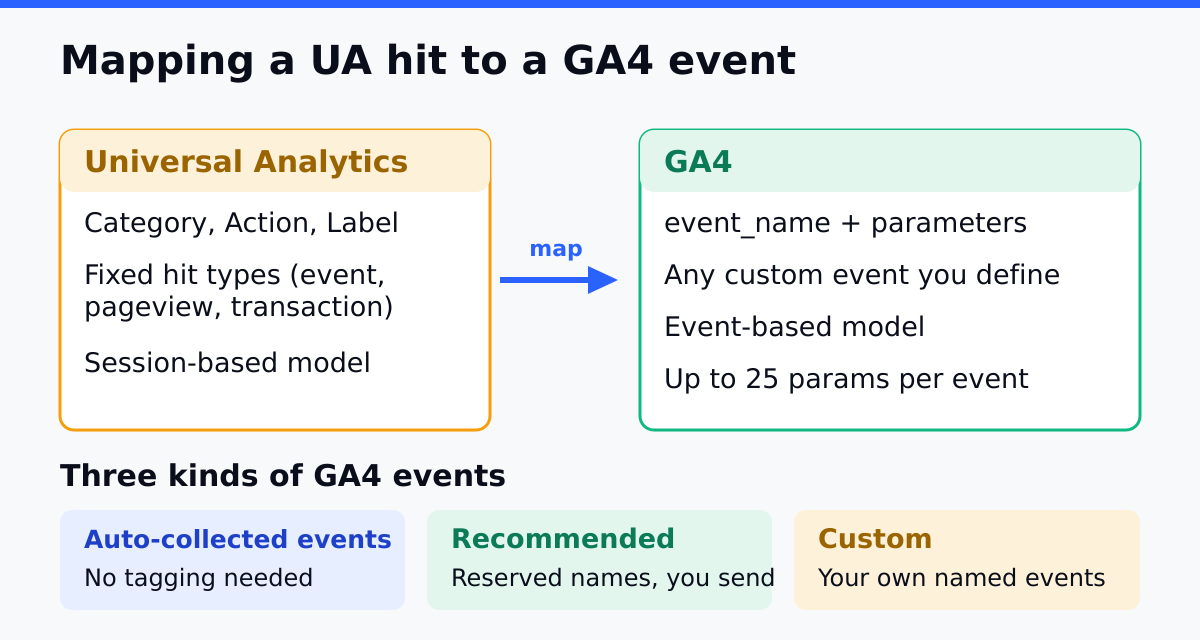
Universal Analytics forced every event into four fixed fields. You sent a category, an action, an optional label, and an optional numeric value. Everything you ever tracked — downloads, video plays, form submits — had to be flattened into that shape, which is why teams ended up with categories like Outbound Link and labels stuffed with URLs.
GA4 inverts this. An event has a name and any number of parameters you define. Instead of category: Video, action: Play, label: intro.mp4, you send an event named video_play with parameters like video_title: "intro". The information is the same; the structure is fundamentally different, and that difference is what breaks naive migrations.
| Concept | Universal Analytics | GA4 |
|---|---|---|
| Core unit | Hit (pageview, event, etc.) | Event with parameters |
| Event shape | Category + Action + Label + Value | Event name + custom parameters |
| Extensibility | Fixed four fields | Open parameter set |
| Reporting on detail | Group by category/action/label | Register parameters as custom dimensions |
The Three Kinds of GA4 Events
Before mapping anything, know which bucket each event falls into, because it changes how much work you do:
- Automatically collected. GA4 fires these on its own — first visit, session start, basic page views. You map nothing; just don’t duplicate them.
- Enhanced measurement. Toggled on in the interface — outbound clicks, scrolls, site search, file downloads, video engagement. Many of your old manual events are now covered here for free. Check this list before you rebuild anything.
- Custom events. Everything specific to your business — a quote requested, a plan upgraded, a config saved. These are the events you actually have to design and implement.
The single biggest time-saver in an event migration is realizing how much enhanced measurement already handles. Teams routinely rebuild outbound-link and scroll tracking by hand, only to find GA4 was capturing it the whole time and they now have duplicates.
A Repeatable Mapping Process
Treat this as an inventory exercise, not a guessing game. Work through it in order.
Step 1: Inventory Your Existing Events
Pull the full list of category, action, and label combinations from your old property. Most sites have fewer genuinely distinct events than they expect — a long tail of near-duplicates and one-off experiments you can safely drop. Build a spreadsheet with one row per real event.
Step 2: Decide Keep, Merge, or Drop
For each row, choose one. Keep the events tied to real decisions. Merge near-duplicates that fragmented because of the old four-field constraint. Drop the experiments and noise nobody has looked at in a year. A migration is the rare clean moment to prune — take it.
Step 3: Check Enhanced Measurement First
Before designing any custom event, confirm it isn’t already covered by enhanced measurement. Cross off every kept event that GA4 now captures automatically. What remains is your true custom-event workload.
Step 4: Name the Surviving Custom Events
For each event that survives, assign a GA4 event name and list its parameters. Translate the old fields into parameters that carry the same meaning. The mapping below shows the pattern:
| UA (category / action / label) | GA4 event name | GA4 parameters |
|---|---|---|
| Form / Submit / Newsletter | form_submit |
form_name: "newsletter" |
| Download / Click / pricing.pdf | file_download (enhanced) |
file_name, link_url |
| Video / Play / intro.mp4 | video_play |
video_title: "intro" |
| Ecommerce / Purchase / order-123 | purchase |
transaction_id, value, currency |
Step 5: Register Parameters as Custom Dimensions
Sending a parameter isn’t enough to report on it. In GA4 you must register each custom parameter as a custom dimension before it appears in reports. Skip this and the data is collected but invisible — a failure mode that surfaces weeks later when someone tries to build a report and finds an empty field.
Naming Conventions That Keep Data Queryable
GA4’s open parameter model is freedom, and freedom without discipline becomes a swamp. A few conventions, decided once and applied everywhere, keep your data legible:
- Use
snake_casefor events and parameters. Match the platform’s own recommended events so your data blends with the built-ins. - Prefer recommended event names where one exists. Use
purchase,sign_up, andsearchrather than inventing synonyms; some reports key off the standard names. - Keep names broad, push specifics into parameters. One
form_submitevent with aform_nameparameter beats twenty separate per-form events. - Mind the limits. GA4 caps the number of distinct event names and registered custom dimensions. Designing broad events with parameters keeps you well under those ceilings.
The “broad event, specific parameter” rule is the one that pays off most. It keeps your event count low, your reports flexible, and your future self able to slice by a dimension you didn’t anticipate at design time.
Common Mistakes
Mistake 1: Re-creating Enhanced Measurement Events by Hand
Manually rebuilding scroll, outbound-click, or download tracking that GA4 already captures produces double counts. Fix: audit enhanced measurement before writing a single custom event.
Mistake 2: One Event Per Variation
Creating form_submit_newsletter, form_submit_contact, and so on explodes your event count and hits platform limits. Fix: one form_submit event with a form_name parameter.
Mistake 3: Sending Parameters but Not Registering Them
Parameters not registered as custom dimensions are collected but unreportable. Fix: register every parameter you intend to report on, and verify it appears before you trust it.
Mistake 4: Migrating Every Old Event Verbatim
Carrying over years of accumulated junk events buries the signal you actually use. Fix: use the migration to prune — keep, merge, drop, then implement only what survives.
Validate Before You Trust the New Events
Once your custom events are live, confirm they fire correctly before relying on the data. Use the platform’s real-time and debug views to watch events arrive with the right names and parameters, then run the old and new tracking in parallel for a couple of weeks. Compare event volumes side by side. They won’t match exactly — the models differ — but large unexplained gaps point to a mapping you got wrong.
That parallel-run window is your safety net. It’s far cheaper to catch a misnamed event while the old system is still recording than to discover three months later that a key conversion was never tracked.
Continue Learning
- Migrate from Universal Analytics to GA4 — the full migration this event-mapping work sits inside.
- Mistakes and Pitfalls When Switching Analytics Platforms — the broader errors that derail migrations.
- Analytics Audit Checklist — verify your event tracking is sound after the move.
- Conversion Funnel Analysis — what well-mapped events let you actually measure.
- Server-Side Tracking — where these events go once you route collection server-side.
Bottom Line
Mapping Universal Analytics events to GA4 is a translation between two incompatible models, not a copy-paste. Inventory your real events, decide which to keep, merge, or drop, and check enhanced measurement before rebuilding anything by hand. Name the survivors broadly, push specifics into parameters, and register those parameters as custom dimensions or they’ll never reach a report.
Then validate in real time and run parallel tracking long enough to trust the numbers. Done with discipline, the migration is also a cleanup: you arrive in GA4 with fewer, clearer events than you left behind — and data you can actually query.