Once you’ve decided to move tracking off the visitor’s browser, the next question splits teams in two: do you host the tagging server yourself, or pay a managed provider to run it? The decision shapes your monthly cost, your maintenance burden, and how much of your data path you actually control. Get it wrong and you either drown in DevOps you didn’t budget for, or pay a recurring fee for something a small VPS could do.
This guide compares self-hosted and managed server-side tracking hosting across the dimensions that decide it in practice: setup effort, ongoing maintenance, cost shape, data control, and scaling. There’s no universally correct answer — only the right answer for your team’s resources and risk tolerance.
What “Hosting” Means for a Tagging Server
A server-side tagging setup needs a server running somewhere on a first-party subdomain, such as analytics.yourdomain.com. The browser sends events to that endpoint; the server forwards them to your analytics and ad platforms via server-to-server calls. The container that does this work is the same regardless of who hosts it. What differs is who owns the box it runs on, who patches it, and who gets paged when it falls over.
If the concept itself is still fuzzy, our broader guide to server-side tracking covers why teams move data collection server-side in the first place. This article assumes you’ve already decided to do it and are choosing the hosting model.
Self-Hosted vs Managed: The Core Trade-Off
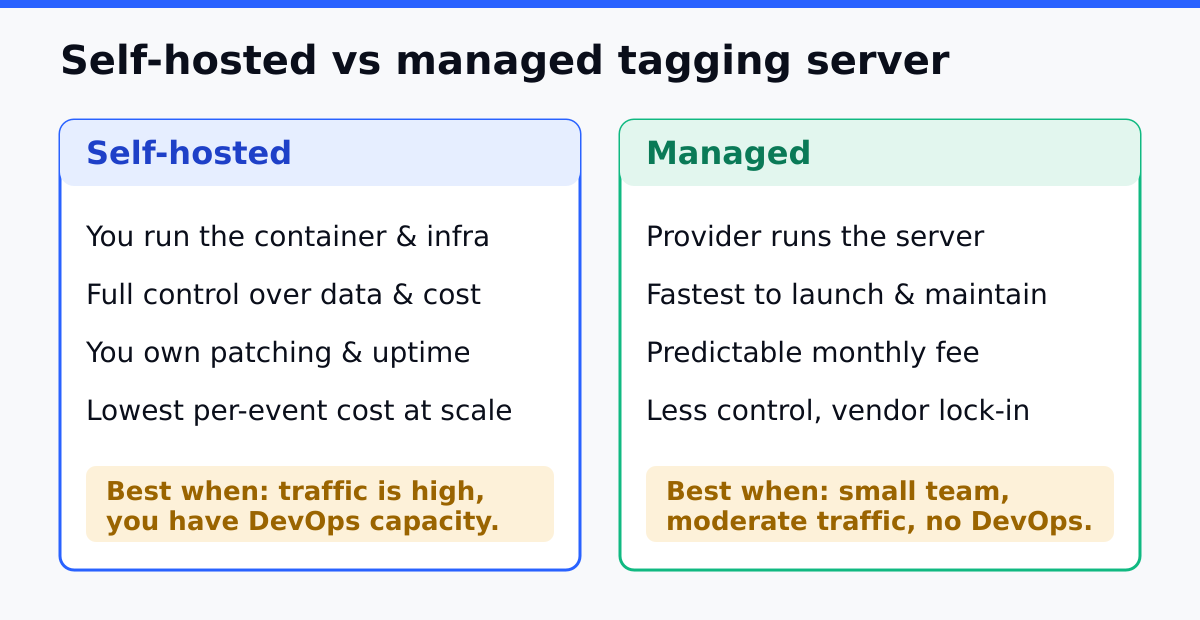
The trade-off is the classic one between control and convenience. Self-hosting gives you full ownership of the data path and a cost that scales with raw infrastructure. Managed hosting gives you a working endpoint in under an hour and offloads patching, scaling, and uptime to someone else, at the price of a recurring fee and one more vendor in your data flow.
| Dimension | Self-hosted | Managed |
|---|---|---|
| Setup time | Hours, plus DNS and SSL | Often under an hour |
| DevOps required | Yes, ongoing | Effectively none |
| Cost shape | Raw infrastructure, scales with traffic | Subscription tied to request volume |
| Data path control | Full — data never leaves your infrastructure | Passes through the provider’s edge |
| Patching & uptime | Your responsibility | Provider’s responsibility |
| Scaling | You configure instances and autoscaling | Handled within plan limits |
Read the table top to bottom and a pattern emerges: every advantage of self-hosting is a responsibility, and every advantage of managed hosting is a dependency. Which side of that you prefer usually tracks how your team is staffed.
The Real Cost Is Maintenance, Not Hosting
The monthly server bill is the number people compare first, and it’s the wrong number to fixate on. A small tagging server runs on modest infrastructure. The genuine cost of self-hosting is the engineering attention it demands after launch:
- Container updates. The tagging image ships new versions; someone has to redeploy.
- SSL renewal. A lapsed certificate silently kills all tracking through the subdomain.
- Capacity planning. Traffic spikes need headroom you provisioned in advance.
- Monitoring. The server is now critical infrastructure; if it’s down, tracking is down for every platform at once.
- Incident response. When it breaks at an inconvenient hour, you own the page.
None of these are hard individually. Together they’re a standing commitment of engineering hours that a managed provider absorbs for you. When you compare costs, weigh the subscription fee against the loaded hourly cost of the person who would otherwise carry that maintenance — that’s the honest comparison.
When Self-Hosting Is the Right Call
Self-hosting earns its keep when one of these is true:
- You already run cloud infrastructure. A team with existing DevOps practice and on-call rotation absorbs one more service cheaply.
- Data residency is non-negotiable. If a compliance requirement says event data cannot pass through a third party, self-hosting is the only path that satisfies it.
- Volume is high and steady. At large, predictable request volumes, raw infrastructure can undercut per-request subscription pricing.
- You want full configuration freedom. Custom transformations and routing logic are easier when you own the box.
The common thread is that you already have the operational muscle, or you have a requirement that managed hosting structurally can’t meet.
When Managed Hosting Is the Right Call
Managed hosting is the better default for most teams, and not as a compromise:
- You have no spare DevOps capacity. Marketing and small product teams shouldn’t be on call for a tagging server.
- You need it live this week. A managed endpoint with SSL and subdomain handled is the fastest route to a working setup.
- Your traffic is variable. Letting the provider absorb spikes is easier than over-provisioning your own instances.
- Uptime guarantees matter more than control. A provider whose business is uptime will usually beat a side-project server.
The trade you’re accepting is a recurring fee and one more vendor in your data path. For a team without DevOps headroom, that’s a good trade.
A Decision Framework
Answer these in order and stop at the first clear signal:
| Question | If yes |
|---|---|
| Does a compliance rule forbid third-party data handling? | Self-host — it’s the only option that qualifies |
| Do you already run cloud infra with on-call? | Self-host — marginal cost is low |
| Is request volume very high and steady? | Lean self-host — infra may undercut subscription |
| Is your team marketing-led with no DevOps? | Managed — don’t manufacture an on-call burden |
| Do you need it live within days? | Managed — fastest path to a working endpoint |
Most teams hit a clear answer in the first three rows. If you’re genuinely torn, start managed — switching to self-hosted later is straightforward, while the reverse means unwinding infrastructure you’ve already built.
Common Mistakes
Mistake 1: Comparing Server Cost, Ignoring Maintenance Cost
The infrastructure bill is the small number. The engineering hours to maintain it are the large one. Fix: add the loaded cost of ongoing maintenance to the self-hosted column before you compare.
Mistake 2: Self-Hosting Without Monitoring
A tagging server that fails silently takes all tracking with it, and you may not notice for days. Fix: set up uptime and error monitoring before you route real traffic, not after the first outage.
Mistake 3: Under-Provisioning for Traffic Spikes
A single instance that handles your average load will drop events during a campaign surge. Fix: configure autoscaling or keep warm headroom; treat the tagging server as the production dependency it now is.
Mistake 4: Letting SSL Lapse on the Subdomain
An expired certificate on the tagging subdomain blocks every event quietly. Fix: automate certificate renewal and alert on expiry well before the deadline.
Continue Learning
- Server-Side Tracking: Why It Matters and How to Set It Up — the foundation this decision builds on.
- Cookieless Tracking — measuring traffic when browsers fight client-side tags.
- First-Party Data Strategy — why owning the data path matters beyond tracking.
- GDPR-Compliant Analytics — the compliance angle that can force self-hosting.
- Analytics Audit Checklist — catch the silent failures a tagging server can introduce.
Bottom Line
The self-hosted versus managed choice for server-side tracking comes down to whether you have the operational capacity to run critical infrastructure. If you already have DevOps and on-call, or a compliance rule that forbids third-party handling, self-host. If your team is marketing-led, your traffic is variable, or you need it live this week, choose managed and treat the fee as buying back engineering attention.
Either way, the server is now production infrastructure. Monitor it, automate its certificate renewal, and give it headroom for spikes. The hosting model you pick matters far less than treating the thing as the critical dependency it has become.