If you already run an analytics and ad stack in the browser — GA4, a Meta Pixel, maybe TikTok and a couple of conversion tags — this guide is for you. It is not a “what is server-side” explainer and it is not a vendor swap. It is the migration: how to move an existing client-side setup to server-side tracking without losing the numbers your reporting already depends on.
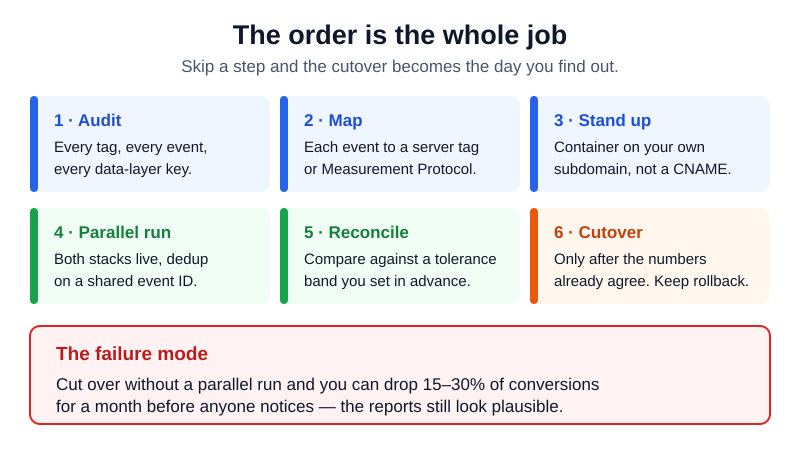
The honest framing first. Migrating to server-side tracking is an architectural change, not a plugin install. You are relocating data collection from the visitor’s browser to a server you control, and every tag, every event, and every consent decision has to be re-pointed. Done carelessly, you can silently drop 15-30% of your conversions for a month before anyone notices. Done in the right order — audit, map, parallel-run, reconcile, cutover — the cutover day is a non-event, because by then the server numbers already match the client numbers within a tolerance you defined in advance. That ordering is the whole job.
For the case for the architecture — how much data it recovers, how an sGTM container works conceptually, and what it costs to run — see why server-side tracking matters. This page assumes you have already decided it is worth investigating and asks the next question: how do you get there from a live client-side stack.
Client-Side vs Server-Side — What Actually Changes
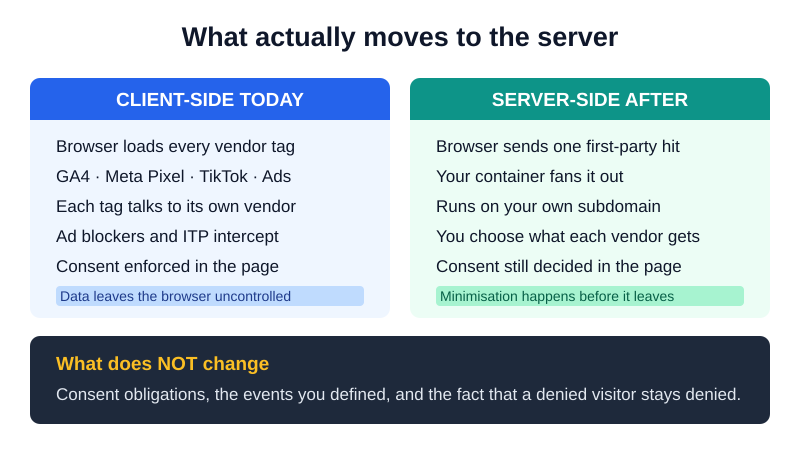
In a client-side setup, the browser does the work. It loads a tag manager, the tag manager loads a dozen vendor scripts, and each script sets its own cookies and fires its own requests directly to Google, Meta, and the rest. The browser is the integration layer. That is also the problem: the browser is hostile territory. Ad blockers strip third-party scripts, Safari’s ITP caps JavaScript-set cookies at 7 days, and a consent banner gates the whole thing behind a click a large share of visitors never give.
In a server-side tracking setup, the browser sends one first-party request to an endpoint on your own subdomain — something like sgtm.yourdomain.com. A server container running there receives the event, then forwards it to each destination over server-to-server APIs: the GA4 Measurement Protocol, the Meta Conversions API, the Google Ads API, and so on. The browser no longer talks to vendors directly. It talks only to you, and you talk to the vendors.
What this buys you: a single first-party request that ad blockers cannot distinguish from your own assets, server-set cookies that survive ITP, and one chokepoint where you control every byte that leaves your infrastructure. What it costs you: a server to run, a payload to maintain for each destination, and a class of bugs that used to live in the browser console now living in server logs. The migration moves you from the first picture to the second without the numbers wobbling in between.
Before You Migrate — Is It Worth It for You?
Server-side tracking is not free and it is not always worth it. The recovered data has to be worth more than the engineering time and the monthly hosting. Two questions decide it: how much data are you actually losing, and what is that data worth to a decision you make.
When server-side pays off (and when it doesn’t)
It pays off when you spend money on the data. If you run paid acquisition, the recovered conversions feed back into ad-platform optimization — Meta’s published case studies report roughly a 13% decrease in cost per action after adding the Conversions API, and Google reports 5-15% more conversions attributed through Enhanced Conversions. On a five-figure monthly ad budget, a few percent of recovered signal pays the server cost many times over. It also pays off when a tech-savvy audience runs ad blockers heavily — developer, SaaS, and B2B audiences can sit at the high end of the 26-42% ad-blocker range, which means client-side is missing a large, non-random slice of your best users.
It does not pay off when analytics is read-only. If nobody acts on a 15% data gap — no budget shifts, no campaign decisions, no model retrains because of it — then you are buying precision you will not spend. A low-traffic content site with no paid spend gets a faster page and a cleaner consent story, but the marginal conversions it recovers are rounding error. Be honest about which side you are on before you commit a month of engineering.
Step 1 — Audit Your Current Client-Side Stack
You cannot move what you have not counted. Most migrations that lose data lose it here: a tag nobody remembered was firing, a custom event read straight off a button click instead of your data layer, a parameter that one report quietly depends on. Before you stand up anything server-side, produce a written inventory of the current stack.
Inventory your data layer and tags
Open your tag manager and list every tag, every trigger, and every variable. For each tag record: the destination (GA4, Meta, Ads, etc.), the event it sends, the parameters it carries, and whether it reads from the data layer or from the DOM. DOM-scraped tags are the fragile ones — they break the moment the server takes over, because there is no DOM on the server. Anything that matters has to be expressed as a structured data layer push before it can be migrated, so flag those for conversion now.
Then audit consent. Note which tags currently fire only after consent, which categories they belong to, and how the current banner gates them. Consent is the part most likely to silently break in the move, because the server has to be told what the browser knew about the visitor’s choice. Finally, snapshot the numbers you are migrating against: pull 28 days of conversions, sessions, and revenue per channel from GA4 and from each ad platform. These are your reconciliation baselines. If you do not record them now, you will have nothing to compare the server numbers to later.
Step 2 — Map Each Event to a Server-Side Tag
With the inventory in hand, migrating to server-side tracking becomes an event mapping problem: every client event needs a defined route to a server-side destination — source event in, destination payload out, parameter by parameter. Do this on paper (or in a spreadsheet) before you build, because the gaps show up here: a parameter GA4 expects that your data layer never sent, a currency field Meta requires, an event name that means one thing client-side and another server-side.
Measurement Protocol vs server-side GTM tags
There are two ways to deliver an event to a destination, and a migration usually uses both. The Measurement Protocol is a direct server-to-server API: you POST a JSON payload to GA4’s endpoint with your API secret, no container required. It is the right tool for backend events that never touch a browser — a subscription renewal, a refund, an offline conversion. The trade-off is that you assemble and maintain the payload yourself, including the client_id needed to stitch the event to the right user.
A server-side GTM (sGTM) container is the other route, and for most front-end events it is the workhorse of a server-side tracking migration. The browser sends events to your container; tags inside it transform the data and forward it to GA4, Meta CAPI, and others, reusing one ingested event across many destinations. This is the better fit for front-end events — page views, add-to-cart, purchase — because sGTM handles client-id continuity, batching, and the per-vendor payload shaping for you. A typical migration routes browser events through the server-side GTM container and reserves the raw Measurement Protocol for backend and offline events. Map each event to whichever route fits, and write the chosen route into your inventory so nothing is migrated twice or not at all.
Step 3 — Stand Up the Server Container on Your Subdomain
Now build the destination. Provision a server container — Google’s Cloud Run, a managed host, or your own infrastructure — and this is the step where most first migrations quietly go wrong: the container must answer on your own first-party subdomain, not on a vendor’s hostname. If your events flow to something.googletagmanager.com instead of sgtm.yourdomain.com, you have built a server-side container with client-side weaknesses: the request is third-party again, ad blockers see it, and the cookies it sets fall back under ITP’s 7-day cap. The entire point of server-side tracking is the first-party hostname. Pin it and verify it before you send a single real event.
Concretely: create a subdomain, point it at the container, terminate TLS there, and confirm in the browser network tab that the collection endpoint is your domain and the response sets a first-party cookie. Then wire one event end to end — usually page_view — and watch it arrive in GA4’s real-time report through the server path. Do not map all 30 events until the first one demonstrably lands.
Step 4 — Run Client and Server in Parallel
This is the step that separates a server-side tracking migration from a gamble, and the one competitors skip. You do not cut over. You run them in parallel: the existing client-side stack keeps firing into your live property exactly as before, while the new server-side path fires the same events into a separate GA4 property (or a clearly tagged data stream). For a window of weeks, both pipelines collect the same traffic independently, and you compare them. The client side stays authoritative for reporting; the server side is on probation until it earns the role.
How long to parallel-run, and what to compare
Two to four weeks is the usual parallel-run window — long enough to cover a full weekly cycle plus a weekend or two, and to catch the slow events. If you have meaningful monthly seasonality (payday spikes, billing cycles), bias toward four weeks. Shorter than two and you will not have enough volume per event to tell a real delta from daily noise.
Compare at the level you report at, not just totals. For each key event — page_view, session_start, add_to_cart, purchase, and your primary conversion — line up server count against client count per day, and watch revenue and key dimensions (channel, device, country) too, because a parallel-run that matches on totals can still be quietly mis-attributing. A purpose-built way to do this is to reconcile the two data sets by date-joining the exports and flagging anything outside your tolerance. The output is not a yes/no — it is a per-event table of how far apart the two pipelines are, which is what the next step consumes.
Step 5 — Reconcile the Deltas
The two pipelines will not match exactly, and they are not supposed to. The server side will usually report more than the client side — that recovered data is the whole reason you migrated. The job of reconciliation is to decide whether each gap is the expected recovery or an actual bug, and you make that call against tolerance bands you set in advance. Our reconciliation methodology and how we set tolerances goes deeper, but the working idea is: define an acceptable range per event, then investigate anything outside it.
Tolerance bands and event deduplication
Reasonable starting bands: page-level metrics (page_view, sessions) should land within roughly ±5% — they are high-volume and stable, so a larger gap usually means a firing or consent bug, not recovery. Conversions and revenue are where you expect the server side to run higher; a server count 5-20% above client is the recovered signal you came for, and that range is a feature, not a failure. A server count below client on any event is always a red flag — it means the server path is dropping data the browser caught, and you do not cut over until you have found out why.
The opposite failure is double counting. During the parallel run you may have the same event firing client-side and server-side into the same destination — dual-tagging the same event — and without a shared key you will inflate conversions on whichever platform receives both. The fix is event deduplication: send a stable, identical event ID on both the browser and server versions of the event so the destination (Meta CAPI especially) can recognize them as one and drop the duplicate. Verify event deduplication is actually working in the platform’s event-quality view before you trust any conversion total — a parallel run with broken dedup will tell you everything is fine while quietly doubling your numbers.
Step 6 — Cutover (and Keep a Rollback Path)
Cutover should be anticlimactic. By now the server numbers have matched the client numbers within tolerance for at least a couple of weeks, dedup is verified, and consent flows correctly. The cutover itself is just promoting the server-side pipeline to authoritative: point your live reporting and ad-platform conversions at the server property and stop treating it as a shadow. Do it at a low-traffic time, change one thing, and watch real-time for an hour.
What makes a cutover safe is the rollback path you keep behind it. Do not rip out the client-side tags on cutover day. Leave them firing (or one toggle away from firing) for one more reporting cycle, so that if a problem surfaces — a destination rejecting payloads, a consent edge case, a parameter you missed — you can revert to the known-good client-side path in minutes. A migration with no rollback path is not a migration; it is a bet. Only after a clean post-cutover cycle do you decommission the redundant client-side tags, one destination at a time.
What Breaks When You Go Server-Side
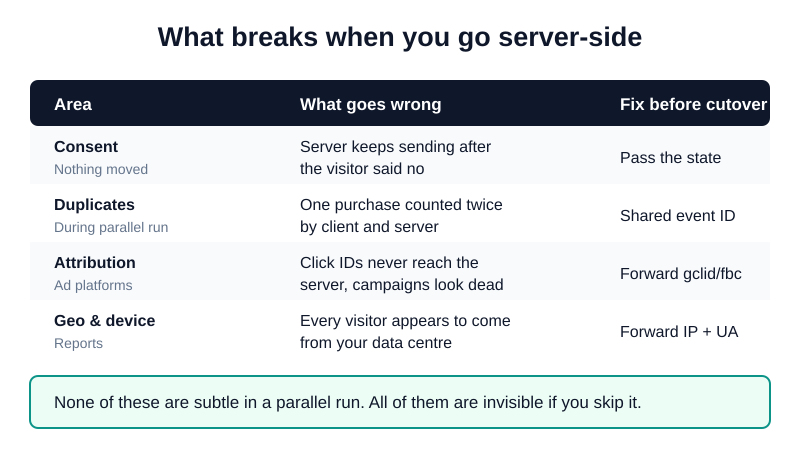
Three things break predictably when you migrate to server-side tracking. Knowing them in advance turns each from an outage into a checklist item.
Consent, ad-platform attribution, and dedup
Consent. Moving collection to the server does not move you out of GDPR’s scope — you still need a lawful basis, and the standard one for analytics is Consent Mode v2 riding alongside server-side tracking, not replacing it. The break happens when the server forwards events it should have suppressed because the consent signal never reached it. The server only knows what the browser tells it, so the consent state has to travel with the event into the container and be honored there. Test the no-consent path explicitly: decline the banner, fire an event, and confirm the destination receives a consent-denied (or nothing), not a full payload.
Ad-platform attribution. Server-side changes how platforms see your conversions. For Meta especially, the Conversions API needs strong match parameters and the same event ID as the browser pixel, or attribution quality drops and the platform stops crediting campaigns it used to. Watch your event-match-quality score through the migration; a healthy server-side setup should hold or improve it, not degrade it. For Google Ads, make sure Enhanced Conversions data still flows with the server events, since that is what reconstructs the click-to-conversion link the browser used to provide.
Deduplication. Covered above, but it earns its place on the breakage list because it fails silently. Nothing errors when you double-count — the dashboards just read high, decisions get made on inflated numbers, and you find out when the ad platform’s reporting and your own diverge. Make verified event deduplication a hard gate before cutover, not a thing you check afterward.
One more fork worth naming: this guide assumes you are keeping your current destinations and changing only how data reaches them. If the real goal is to leave a platform entirely — if you’re leaving GA4 for something else — that is a different project with its own migration path, and the destination changes the event mapping above. Decide which one you are doing before Step 1.
FAQ
What does it mean to migrate from client-side to server-side tracking?
It means relocating where your analytics and ad events are processed — from the visitor’s browser to a server you control — while keeping the same destinations (GA4, Meta, Google Ads). In a client-side setup the browser loads vendor scripts that each call out to their own platform. After migration, the browser sends one first-party request to a server container on your subdomain, and that container — usually a server-side GTM container — forwards each event to the destinations over server-to-server APIs like the Measurement Protocol and Meta CAPI. Migrating to server-side tracking is an architectural change, not a vendor swap: you are not changing what you measure, only how the data gets there. The practical payoff is data that ad blockers and ITP can no longer strip; the cost is a server to run and a payload to maintain per destination.
How do you migrate to server-side tracking without losing data?
You never cut over blind. The order that protects the numbers when you migrate to server-side tracking is: audit the current stack and snapshot 28 days of baseline metrics, map each event to a server-side route, stand up the server container on your own subdomain, then run client and server in parallel for two to four weeks. During the parallel run the client side stays authoritative while you compare the server numbers against it daily. Only after the server pipeline matches within your tolerance bands — and event deduplication is verified — do you cut over, and even then you keep the client-side tags as a rollback path for one more cycle. Data loss almost always comes from skipping the audit or the parallel run; the process exists to make those skips impossible.
How long does a client-side to server-side migration take?
Plan for four to eight weeks end to end for a typical stack, most of which is waiting, not building. The audit and event mapping take a few days. Standing up the server container and wiring the first verified event is usually one to three days of engineering. The long pole is the parallel-run window — two to four weeks of letting both pipelines collect real traffic so you have enough volume to tell recovery from bugs. Reconciliation and fixing the deltas it surfaces add a few more days, and you hold a rollback cycle after cutover. A simple stack on a single platform can compress to a few weeks; a multi-destination commerce stack with offline conversions and strict consent requirements runs to the longer end. The engineering hours are modest; the calendar is dominated by the parallel run you should not rush.
What breaks when you move tracking server-side, and how do you check?
Three things break predictably: consent, ad-platform attribution, and deduplication. Consent breaks when the server forwards events it should have suppressed because the Consent Mode v2 signal never reached the container — check it by declining the banner and confirming no full payload leaves. Attribution breaks when Meta’s Conversions API loses match parameters or event IDs — check your event-match-quality score and confirm it holds or improves. Deduplication breaks silently when the same event fires client-side and server-side without a shared ID — check the platform’s event-quality view to confirm duplicates are being collapsed. The parallel run is your detection mechanism for all three: a per-event comparison against baseline will surface a consent drop as a sudden shortfall, an attribution break as missing channel data, and a dedup failure as inflated conversion counts.
Do you have to remove all client-side tags after migrating?
No, and you should not remove them on cutover day. Keep the client-side tags firing through at least one reporting cycle after cutover as your rollback path — if a destination rejects payloads or a consent edge case appears, reverting to the known-good client path takes minutes instead of a rebuild. After a clean post-cutover cycle, decommission the redundant tags deliberately, one destination at a time, watching each for a shortfall. Some tags may stay client-side permanently by design: events that are genuinely browser-only and that you have decided not to route through the server can keep firing as they are. The goal is not “zero client-side tags,” it is “no client-side tag firing into a destination the server now owns” — that is what causes the dual-tagging and double-counting you spent the reconciliation step eliminating.
How do you validate server-side data matches your old client-side numbers?
Export both pipelines for the same date range and join them by day and by event, then compute the delta and percentage difference per event — that is exactly what a parallel-run validator automates. Compare at reporting granularity, not just grand totals: per-event counts, revenue, and key dimensions like channel and device, because a setup that matches on totals can still mis-attribute. Judge each delta against a tolerance band — roughly ±5% for high-volume page metrics, and a server count 5-20% above client for conversions (that gap is the recovered data, not an error). Anything outside the band, and especially any event where the server reports fewer events than the client, is a bug to fix before cutover. Validation is not a one-time check; you run it daily through the parallel-run window until the deltas are stable and explained.
The pattern under all six steps is the same: never let the server-side path become authoritative until it has proven, on your real traffic, that it matches what you already had — plus the data you were losing. Audit so you know what to move, map so nothing is dropped, parallel-run so you can see the difference, reconcile so you can explain it, and cut over with a rollback path so a surprise is recoverable. That is the difference between a migration and a hope.